/ Cluster · YouTube competitor analysis
YouTube competitor analysis: the two questions public data can actually answer
YouTube competitor analysis is sold by most of the SERP as a dashboard problem — pay a tool, get a screen of charts, learn the secrets of any competitor channel. The pitch falls apart once you read the YouTube Data API documentation. The fields a third party can actually read for a channel they do not own are narrow: channel age, subscriber count (rounded), total views, video count, and per-video metadata. Everything else lives behind the owner-only YouTube Analytics API. Useful competitor analysis answers two questions only: what public-data signal does the competitor exhibit, and what format / cadence / hook patterns are they running. The rest is guess-work dressed up as analytics. This page is the six-step workflow that answers the answerable questions, built from thousands of channels we've scanned to date.

Ai stories by shano
 45d · 36 uploads
YOU & ME
 45d · 25 uploads
Dootoons TV
 45d · 69 uploads
Mr Pawsome
 42d · 64 uploads
sajkcasqq
 38d · 38 uploads
OP Nigma

FactD
 45d · 31 uploads
Cognexa Talks
 39d · 21 uploads
MapLore
What "YouTube competitor analysis" actually means in 2026
Competitor analysis on YouTube is a strange category. The SERP is dominated by inspection tools — vidIQ, TubeBuddy, Social Blade, Socialinsider — each promising a comprehensive view of any competitor's channel. The marketing copy talks about audience analytics, performance benchmarking, growth insights, content strategy decoders. The product, once you log in, is a screen of public Data API fields plus a few proprietary estimates layered on top. Nothing in the screen is data the buyer could not read themselves with a free Google Cloud API key. The "competitor analysis" label is doing most of the work; the underlying data floor is the same public metadata any third party can access.
The reason the gap exists is structural. YouTube exposes two separate APIs. The Data API v3 is public — anyone with an API key can read the metadata fields above for any channel. The Analytics API is owner-only — the channel owner authenticates, and the API returns watch time, retention, traffic sources, RPM, and the rest of the metrics that would actually answer the questions creators want answered. No third party has access to the second API for a channel they do not own. None. The wall is structural, not a feature gap a better tool could fill.
Given that wall, useful competitor analysis collapses to two questions. Question one: what public-data signal does the competitor exhibit? Channel age, first-five-video performance, view velocity, subscriber band, video count, upload distribution. These are readable, falsifiable, and computable from Data API fields any researcher can pull. Question two: what format and cadence patterns are they running? Video length distribution, Shorts ratio, thumbnail template, title formula, publish frequency, hook structure in the first three seconds. These are observable by watching the channel; they don't require any private metric to read.
Everything else — RPM, watch time, audience retention, traffic source breakdown, click-through rate on impressions, audience demographics — sits behind the owner-only Analytics API and cannot be honestly answered for a channel a researcher does not own. Tools that imply otherwise are either guessing from public extrapolations or laundering proprietary "estimates" as data. The corrective is not to find a better dashboard. The corrective is to write a workflow that answers the two answerable questions and is honest about ignoring the rest.
This page is that workflow. The next sections cover the public-vs-private boundary in detail, then walk through a six-step routine that runs entirely on Data API fields, then close with what we deliberately don't claim and the mistakes that show up when researchers try to claim more than the data supports.
What's public vs what's private for any competitor channel
The Data API / Analytics API split is the structural reality every competitor-analysis claim has to survive. The YouTube Data API channels.list reference documents the fields a third party can read; the Analytics API documentation describes the authentication boundary that gates the private fields. Skipping past this section is how researchers end up trusting "competitor RPM" numbers no third party could have produced.
Public Data API v3 fields (readable for any channel): channel ID, channel title, channel description, channel creation date, country (if set), custom URL (if set), subscriber count (rounded down to three significant figures, or hidden entirely if the owner has hidden it), total view count, video count, upload playlist ID, channel banner image, channel thumbnail image, and per-video metadata — video ID, title, description, publish date, duration, view count, like count, comment count, tags, default language, default audio language, and category ID. Every signal in the six-step workflow below is computable from these fields. Every claim NicheBreakout publishes is defensible from these fields.
Private Analytics API fields (owner-only, not readable for any channel you don't own): watch time, audience retention curves, average view duration, average percentage viewed, click-through rate on impressions, impression count, traffic source breakdown, audience demographics (age, gender, geography), subscriber-driven views vs non-subscriber views, end-screen click-through rate, card click-through rate, monetized playbacks, RPM, CPM, estimated revenue, ad impressions, and the rest of the monetization-and-engagement surface. Every one of these fields lives behind https://www.googleapis.com/auth/youtube.readonly or stricter OAuth scopes tied to the channel owner's account. The Data API simply does not expose them.
The honest read on third-party tools is that none of them have a different data floor than what the Data API exposes. vidIQ's competitor screens, TubeBuddy's channel comparison, Social Blade's history graphs, NoxInfluencer's creator profiles, ChannelCrawler's directory listings — all of them wrap the same public fields, present them differently, add historical scraping, and sometimes layer extrapolations on top. None of them have a back-channel into the Analytics API for channels they do not own. The differentiation is presentation, history depth, and which secondary features they bolt on; it is not deeper data.
The practical implication for a researcher is that any competitor-analysis routine has to be designed around the public fields. The six-step workflow below does exactly that. It produces useful, falsifiable output because it works inside the public boundary, not because it pretends to see past it.
The six-step public-data competitor analysis workflow
The workflow below is the routine NicheBreakout uses internally to read any candidate competitor channel, and the same routine a researcher can apply with a free Google Cloud API key or by clicking through to YouTube directly. It is six steps because the public Data API exposes roughly six independent dimensions worth reading; adding a seventh step would either repeat one of the existing dimensions or wander into private-metric territory the data does not support. Each step is described in its own section below. Run them in order — the discovery step has to come first because inspecting the wrong competitors at high resolution is research theater. Inspecting the right competitors at any resolution is research.
One framing note before the steps. The competitor cohort that matters for a new or growing channel is usually small channels currently breaking out at the same format-topic intersection — not the largest channels in the topic. The largest channels are downstream of years of recommender-trained audience momentum; their current strategy is the steady-state behavior of an already-trained channel, not the format-fit hypothesis a new entrant should copy. The parent YouTube channel research pillar covers the discovery-vs-inspection split in detail. This page assumes the discovery step has produced a candidate cohort and walks through the per-channel routine that runs against that cohort.
Step 1: Identify the right competitors
Competitor identification is the step most researchers skip, and the step that determines whether the rest of the workflow produces useful output. The default behavior is to write down the channels a researcher already knows about — usually the largest channels in the topic, or the channels their favorite YouTube strategist talks about. That cohort is the wrong cohort for almost every research question that matters. The right cohort is small channels currently breaking out at your format-topic intersection — channels under 90 days old, ideally under 45 days old, that are running the format you are considering at meaningful early-traction velocity.
Three discovery surfaces produce a defensible cohort. Surface one: YouTube's own search with date filters. Type a format-plus-topic query ("reddit story shorts", "history short documentary", "finance explainer faceless") into YouTube search, open the filters panel, set upload date to "This month," and scroll. The channels appearing in the first 30-50 results are the channels actively publishing at the intersection right now. Surface two: directory-style finders with age filters. ChannelCrawler exposes channel-age and subscriber filters; setting an age cap of 90 days and a subscriber cap of 50,000 returns a pre-filtered candidate list. Surface three: the small-channel-breakout cohort. NicheBreakout's library is the pre-filtered cohort of small channels currently clearing the three-gate breakout filter; the how to find small YouTube channels sibling page walks through the same filter logic applied manually.
The cohort size that produces useful research is roughly 10-25 channels per format-topic intersection. Fewer than 10 and the format-fingerprint readings below cannot distinguish format-wide patterns from per-channel idiosyncrasies. More than 25 and the per-channel inspection step gets expensive without adding new information, because the format-fingerprint patterns repeat once the cohort is large enough. Pick the cohort, write down the channel IDs, then move to step 2.
Step 2: Read the format fingerprint
Format fingerprint is the cluster of observable, repeatable elements that define a channel's output: video length distribution, vertical vs horizontal orientation, Shorts-to-long-form ratio, faceless vs face-on-camera production mode, single-host vs multi-host, on-screen text density, music vs voice-over vs ambient sound, and visual template consistency across uploads. Format fingerprint is the variable that determines whether two channels are "similar" from the recommender's perspective, and it is the variable a new channel should copy if the goal is to enter the same audience pool as the competitor.
The mechanical version of the reading: pull the channel's uploads tab and look at the first 10-20 videos in publish order. Record video duration for each one (the Data API contentDetails.duration field, or just the duration shown on the thumbnail). Record orientation by checking the video page — the Shorts shelf surfaces vertical videos under 60 seconds, the regular uploads tab surfaces everything else. Record whether each video is faceless or has a host on camera. Record the visual template — title placement, thumbnail composition, text presence — by scanning the thumbnail grid.
A working channel typically locks one format inside the first 10-20 uploads and stays there. The fingerprint variables cluster tightly: most uploads are within ±20% of the same duration, the orientation is consistent, the production mode does not flip between faceless and face-on-camera, and the thumbnail template is recognizable across the grid. A format-mixed channel — three Shorts, one long-form, one livestream, a tutorial, a vlog — teaches the recommender contradicting audience profiles, and the early-traction signal usually flatlines. The fingerprint reading tells you whether the competitor has settled on a format-fit hypothesis or is still iterating.
What the fingerprint does not tell you is causality. A consistent format-fit fingerprint is correlated with the public early-traction signals the next steps read, but the fingerprint alone does not prove the format is working. The signal step (step 6) is where the deterministic gates get applied. The fingerprint step is descriptive — it tells you what the channel is doing, not whether what they are doing is working.
Step 3: Read the cadence and timing
Upload cadence is the variable third-party tools rarely surface as a primary signal, and one of the strongest format-fit predictors in our scan data. A working small channel typically publishes inside a tight cadence in the first 30 days — daily, every other day, twice a week, or some other regular interval the recommender can predict. Channels that publish three uploads in week one and then go silent for two weeks teach the recommender an unstable channel profile, and the format-fit signal cools before it has a chance to compound.
The mechanical reading: pull the publish dates for the channel's first 10-15 uploads and compute the median gap between uploads. The publish-date field is exposed by the Data API as snippet.publishedAt on each video; reading it off the uploads tab works equally well. Record the median gap in days, then look at the distribution — a working channel has a tight distribution (most gaps within ±1 day of the median); a struggling channel has long gaps interspersed with bursts.
Frequency matters separately from cadence regularity. Shorts-first channels typically publish at higher frequency than long-form channels — Shorts have lower production cost per upload, the feed surfaces them on a faster recycle, and the early-traction window is shorter. A Shorts-first channel publishing every other day is at a normal cadence for the format; a long-form channel publishing every other day is at an unusually high cadence and may not be sustainable. Cadence reads need to be calibrated against the format, not compared across formats.
Publish-time-of-day is a weaker signal than cadence regularity but still worth recording. The Data API timestamps publish times in UTC; converting to the channel's apparent target time zone (inferred from the country field or the channel's video language) shows whether the channel is publishing at a consistent local time. Channels publishing at a consistent time-of-day train both the recommender and the existing audience to expect uploads on a schedule; channels publishing at random times have to rely on the recommender alone to surface each new upload.
The early-traction velocity bonus in the scoring model (channel age ≤ 14 days, first-5 sum ≥ 50,000, or views/day ≥ 5,000) sits on top of the cadence reading: a channel publishing on a tight cadence and clearing the velocity bonus is one of the strongest small-channel-breakout signatures the public Data API can produce.
Step 4: Inspect the hook structure
Hook structure is the variable that operates inside individual videos rather than across the channel, and it is the variable that matters most for click-through and first-three-seconds retention. Hook structure is also the variable the Data API exposes least directly — there is no hook field. The reading has to happen by watching a sample of recent videos and reading off the patterns manually.
The mechanical version: pick three to five recent videos from the competitor channel, watch the first three to five seconds of each one with audio on, and write down what they open with. The variables worth recording: opening word or phrase (question? declaration? hook line?), visual style of the first frame (text overlay? face? cold open?), pacing (single cut? rapid cuts? hold on one frame?), sound design (music? voice-over starting before visuals? ambient?), and whether the title plus thumbnail combination is restated in the first three seconds or treated as a premise the video moves past.
Patterns to look for. Channels currently breaking out usually have a recognizable hook template — the opening seconds look and sound similar across uploads, not identical, but built from the same template. Format-fingerprint-consistent channels almost always have hook-template-consistent uploads. Channels with strong fingerprint and weak hook consistency (the format is locked but every upload opens differently) tend to underperform their fingerprint suggests they should; the hook template is the second-order format variable.
The title formula is the companion variable to the hook. Read off the title structures across the first 10-20 uploads: are the titles question-format, list-format, declarative-statement-format, or curiosity-gap format? Are they consistently length-capped (under 60 characters)? Do they include or exclude the topic keyword? A consistent title formula plus a consistent hook template is the channel-level analog of the format fingerprint at the per-video level.
One discipline for this step: do not infer causality from the hook reading. The hook template tells you what the channel is doing, not why the channel is winning. The early-traction signals (step 6) are what tell you whether the channel is winning. The hook reading is descriptive input for a "what would I copy from this format" decision; it is not proof that any specific hook variable is the load-bearing variable.
Step 5: Map the topic-format intersection
The topic-format intersection is what makes a YouTube channel a channel, rather than a loose collection of videos. A working channel is not "history shorts" alone or "world war history" alone — it is "vertical TTS world-war history shorts with cinematic stock visuals and captions on every line." The format is the production-mode part; the topic is the subject part; the intersection is the channel. Researchers who copy the topic alone but film it in a different format end up running a different channel from the recommender's perspective, and the early-traction signal usually flatlines.
The mapping step: list out the topics covered across the channel's first 10-20 uploads, then cross-reference against the format fingerprint from step 2. Record the topic granularity — is the channel running one topic across all uploads ("ancient Rome"), a topic cluster ("ancient civilizations"), or a broad category ("history")? Record the topic recurrence pattern — does the channel return to specific topics on a cycle, or treat each upload as a one-off? Record whether the topic and format combine in a way that constrains the upload — for example, "60-second history shorts" tightly constrains both length and topic, while "long-form documentaries about history" leaves both variables loose.
The intersections worth studying are the ones where the format and topic constrain each other in ways that make the channel replicable. A new researcher can copy the intersection (same format, similar adjacent topic) and run their own topics inside the constraint. A channel running an under-constrained intersection ("anything historical, any length, any production mode") is harder to copy because there is no constraint to import. The most replicable intersections cluster around faceless Shorts-first formats with tight topic constraints — AI storytelling, history shorts, Reddit narration, quiz/trivia, faceless storytelling — which is also the cluster that produces the densest small-channel-breakout signal in our scan data.
The cross-pillar YouTube niche finder page covers the niche-level version of this question (which intersection should you be researching in the first place); this step is the per-channel version that reads off the intersection a specific competitor has already committed to.
Step 6: Score the competitor against the deterministic gates
The deterministic scoring step is what converts the descriptive reading from steps 2 through 5 into a falsifiable verdict on whether the competitor is exhibiting the public-data signature of a small-channel breakout. NicheBreakout applies three hard gates plus two scoring bonuses to every channel in the library; the same gates apply to any competitor a researcher pulls in manually. The full methodology lives on the methodology page; the abbreviated version below is the signal list a researcher can apply with the public YouTube Data API directly.
Channel age
detected within 45 days of channel creationFirst-5 upload views
combined views across the first five public uploads ≥ 10,000Views per day
lifetime channel views ÷ channel age ≥ 1,000Format clarity (bonus)
score weights channels with a clear Shorts-first or long-form-first ratio above mixed-format channelsEarly-traction velocity (bonus)
score boost when channel age ≤ 14 days, first-5 sum ≥ 50,000, or views/day ≥ 5,000
Each of the three hard gates isolates a different piece of the early-traction picture. Channel age ≤ 45 days filters discovery to channels where recommendation surfaces — not subscribers — are doing the audience-finding work, which is the cohort where format-fit signal is readable without the confound of subscriber inertia. First-five-video sum views ≥ 10,000 filters out channels whose first uploads landed flat; five uploads sharing 10,000 views indicates a working content vehicle rather than a single lucky upload. Lifetime views per day ≥ 1,000 is the cleanest velocity check available from public metadata alone, because watch time and impressions live behind the YouTube Analytics API and cannot be third-party-verified.
The two scoring bonuses sharpen ranking inside the filtered set. Format clarity rewards channels with a consistent Shorts-first or long-form-first ratio (the format-fingerprint reading from step 2 feeds directly into this bonus). Early-traction velocity pushes the freshest, fastest-moving channels to the top of the ranking inside any niche. A competitor that clears the three hard gates plus both bonuses is exhibiting the strongest small-channel-breakout signature the public Data API can produce. A competitor that clears the gates but misses the bonuses is still inside the breakout cohort but at the lower end of the velocity range.
Average first-five-video views for every populated grade tier inside our discoveries cohort looks like this (grades with no current members are suppressed until they fill in):
The scoring step produces a verdict, not a story. A competitor either clears the gates or does not; the score either lands in a specific grade band or does not. The descriptive readings from steps 2 through 5 are the input the researcher uses to decide what to copy if the verdict is "yes, this channel is exhibiting breakout signature." The verdict alone, without the descriptive reading, tells you a channel is worth studying. The descriptive reading, without the verdict, tells you what a channel is doing but not whether it is working. The full workflow needs both halves.
What we deliberately don't analyze
NicheBreakout's competitor analysis stops where the public Data API stops. Watch time, audience retention curves, click-through rate on impressions, average view duration, traffic source breakdown, audience demographics, RPM, CPM, monetized playbacks, and estimated revenue are all owner-only fields exposed exclusively through the authenticated YouTube Analytics API, and they do not appear in any NicheBreakout surface — the live library, the Friday digest, the future matured public archive, the methodology page, or anywhere else. Any third party selling "competitor watch time," "competitor RPM," "competitor traffic sources," or "competitor retention" for channels they do not own is either inferring from non-API sources, extrapolating from public counts with assumptions the researcher cannot audit, or fabricating the number.
The boundary is structural, not defensive. The six-step workflow above produces useful output because it runs inside the public boundary, not because it pretends to see past it. A researcher who needs watch time and retention to make a decision has two honest options: own the channel themselves and read those fields off their own Analytics API, or accept that the decision will have to be made from public signals alone. There is no third option where a tool reveals private fields for channels the user does not own; the API simply does not expose them.
The product also does not generate AI narratives describing why a specific competitor is winning. The methodology is deterministic — competitors clear the gates or do not. No post-hoc storytelling about why the algorithm picked them, no inferred audience-demographic claims, no "the secret to this channel's success is..." prose. The descriptive readings from steps 2 through 5 are the researcher's job, not the product's. NicheBreakout publishes the formula and the cohort; readers draw their own causal conclusions from the public data the formula reads.
Every claim on this page is defensible from one of the public Data API fields above, and every channel surfaced in the library carries an outbound link to YouTube so the public metadata is verifiable in one click. The "verifiable on YouTube" property is non-negotiable; if a claim cannot survive that audit, it does not go on the page.
Common mistakes when running competitor analysis
Five mistakes recur when researchers run competitor analysis, and each of them is correctable with a discipline change rather than a tool change. Analyzing only the biggest channel in the topic. The largest channel in a topic is downstream of years of recommender-trained audience momentum; copying its current strategy is copying the steady-state behavior of an already-trained channel, not the format-fit hypothesis a new entrant should copy. The corrective is step 1 — deliberately filter the competitor cohort to small channels under 90 days old at your format-topic intersection.
Treating subscriber count as the primary signal. Subscriber count lags early traction by months, can be rounded down to three significant figures by the Data API, and can be hidden entirely by the channel owner. A channel with 800 subscribers and a first-5 sum of 200,000 views is breaking out; a channel with 80,000 subscribers and 500 views per day is in decline. Subscriber count alone does not distinguish them. View velocity (lifetime views ÷ channel age) and first-five-video sum are stronger signals, and both are public Data API fields any researcher can pull.
Copying the topic without copying the format. A working YouTube channel is a format-topic intersection. A researcher who reads off a viral history-shorts channel's topic list ("Roman emperors, Greek myths, medieval battles") and films those same topics as face-on-camera long-form documentaries is running a different channel from the recommender's perspective. The early-traction signal flatlines. Step 5 (the topic-format intersection mapping) and step 2 (the format fingerprint) exist specifically to keep the format and topic readings paired so a researcher does not import one without the other.
Drawing causality conclusions from public data alone. The six-step workflow tells a researcher what a competitor is doing and whether they are clearing the public-data breakout gates. It does not tell them why the channel is working in the underlying mechanical sense — that would require watch time, retention, traffic source, and impressions, all of which are private. A competitor analysis that ends with "this channel is winning because its retention curve is strong" is overclaiming; the researcher cannot read the retention curve, and any tool that says they can is guessing. Stop at the public-data verdict and the descriptive fingerprint reading; let the researcher draw their own format-copy conclusions from there.
Inspecting the same competitor cohort daily. The public Data API fields don't move that fast. A competitor's channel age increments by one day per day; the first-five-video sum is fixed once the fifth upload is published; lifetime views per day moves slowly. Daily re-inspection produces near-identical output week over week. The discovery step (step 1, finding new competitors to add to the cohort) is the part of the workflow that benefits from a recurring cadence — monthly is usually right. Per-channel re-inspection at high frequency is wasted effort.
Each of these mistakes shares a root cause: the researcher is asking the public data to answer a private-data question. The discipline correction is to scope the analysis to the two questions public data can actually answer (signal and format/cadence/hook patterns) and to accept that the rest of the questions are unanswerable from outside the channel.
Where competitor analysis sits inside the broader research workflow
Competitor analysis is one layer of a larger research workflow. Upstream sits niche selection — deciding which format-topic intersection to research in the first place, which is the question the parent YouTube channel research pillar and the YouTube niche finder sister pillar both cover. Downstream sits the publish-and-measure loop on the researcher's own channel, which is where the private Analytics API fields finally become readable because the researcher owns the channel. The competitor-analysis step in the middle is what tells the researcher which formats and cadences are currently winning at the intersection they have selected, so that the publish-and-measure loop starts from a calibrated format-fit hypothesis rather than a blank slate.
Across NicheBreakout's matured public archive (channels detected when they were under 30 days old and now 60+ days post-detection), the densest niche clusters currently meeting our sample-size threshold are:
This is what we have observed in our scans, not a market-wide claim, and it shifts week over week as new format clusters surface and older ones saturate. Read it as a current snapshot. The Shorts-first vs long-form split inside those top clusters looks like this in our dataset:
Five recurring clusters have dedicated programmatic topic pages where each cluster's currently-breaking-out channels are indexed with the same outbound-link verification as the main library:
- AI story channels: TTS narration plus AI imagery, recurring story templates, Shorts-first publishing.
- Reddit story channels: TTS reading r/AmITheAsshole, r/ProRevenge, r/MaliciousCompliance threads with stock visuals or simple character overlay.
- History shorts channels: fact-stacking with cinematic visuals, vertical and horizontal variants.
- Faceless storytelling channels: broader narrative format spanning fiction and non-fiction.
- Quiz channels: interactive Q&A format, often Shorts-first with text overlays.
If you are using this page as a competitor-analysis entry point, the programmatic pages above are the natural next click: each is a pre-filtered candidate cohort for the six-step workflow to run against. The faceless YouTube niches and YouTube Shorts trends sister pillars cover the production-mode and surface-mode angles for the operators picking which cluster to research first.
FAQ
How do I analyze a YouTube competitor?
Pick the right competitor first, then run a fixed routine against their public Data API fields. The right competitor is usually a small channel under 90 days old at your format-topic intersection, not the largest channel in your topic. Once you have a candidate, the routine is six steps: read channel age, read first-five-video performance in publish order, read format consistency across the first 10-20 uploads, sample three recent thumbnails for visual template, read upload cadence from the first 10 publish dates, and check for post-and-pivot patterns. Every step uses public Data API v3 fields. No private metric (watch time, RPM, retention, traffic source) is required, and no third party has access to those fields for a channel you don't own anyway.
Can I see another YouTube channel's analytics?
No. The YouTube Analytics API is owner-only and authenticated; watch time, audience retention, click-through rate, impressions, traffic source breakdown, average view duration, RPM, and revenue are not exposed to third parties for any channel you do not own. What is publicly readable through the YouTube Data API: channel age, subscriber count (rounded down to three significant figures), total view count, video count, individual video view counts, video metadata, video durations, and publish dates. Any tool that claims to show another channel's watch time, RPM, or traffic-source breakdown is either inferring from non-API data, extrapolating from public counts with assumptions the researcher cannot audit, or fabricating the number.
What's the best YouTube competitor analysis tool?
The tool choice is downstream of the methodology — pick the tool that fits your workflow once you know which questions you're trying to answer. The sibling page YouTube competitor analysis tool covers the comparison directly: vidIQ and TubeBuddy lean toward on-channel optimization, Social Blade and NoxInfluencer lean toward historical scraping, NicheBreakout sits on the small-channel-discovery side. All of them wrap the same Data API v3 fields, so the differentiation is presentation and the secondary features layered on top, not deeper data access that doesn't exist.
How do I find my YouTube competitors?
Start from the format-topic intersection you're entering, not from a list of channels you already know. Open YouTube search, type the format keyword plus the topic keyword ("history shorts", "reddit story narration", "finance explainer faceless"), filter by upload date in the last month, and read off the channels publishing inside the intersection. ChannelCrawler's filters expose channel age and subscriber range; NicheBreakout's library publishes the pre-filtered small-channel cohort. The mistake most researchers make is starting from "who are the biggest channels in finance" — that returns channels that won three years ago, not the channels currently breaking out at the intersection a new channel would actually enter.
Is Social Blade reliable for competitor analysis?
Mostly, for the metrics it reports directly. Social Blade is a wrapper over the same public YouTube Data API fields any third party can read, plus historical scraping for the trend lines. The numbers it shows for current subscribers, total views, and video count are accurate to the rounding the API itself applies (subscribers are rounded down to three significant figures). The daily history is a real differentiator for tracking growth over time. The estimated earnings ranges are not accurate in the literal sense; they are extrapolations from public view counts using assumed RPM ranges, and per-channel RPM lives behind the YouTube Analytics API where no third party can read it. Treat the metrics as accurate; treat the earnings band as decoration.
What public data can I see for any YouTube channel?
Through the YouTube Data API v3: channel ID, channel title, channel description, channel creation date, country (if set), custom URL (if set), subscriber count (rounded to three significant figures, hidden if the channel has hidden subscribers), total view count, video count, upload playlist ID, channel banner, channel thumbnail, and per-video metadata — title, description, publish date, duration, view count, like count, comment count, and tags. Not available without authentication for a channel you don't own: watch time, audience retention, traffic sources, RPM, revenue, subscriber demographics, geographic breakdown, click-through rate on impressions, and average view duration. Everything in the first list is fair game for competitor analysis. Everything in the second list is private and any third party claiming to show it is guessing.
How often should I do YouTube competitor analysis?
Quarterly if you're researching a niche before entering it; monthly if you're already publishing inside a niche and tracking format-fit shifts. The signal that matters most — small channels currently breaking out at your format-topic intersection — refreshes on roughly a 30-to-60-day cadence as new channels clear the early-traction gates and older channels age out of the small-channel window. Daily re-inspection of the same competitor cohort is wasted effort; the public Data API fields don't move that fast and the inspection routine produces near-identical output week over week. The discovery layer (finding new competitors to add to the cohort) is the part of the workflow that benefits from a recurring cadence, not the per-channel inspection step.
How is competitor analysis different from keyword research?
Competitor analysis is channel- and format-level: which channels are running which formats at which cadence, and what does that tell you about the format-topic intersection. Keyword research is video-title- and tag-level: which search strings get traffic and which tags YouTube indexes well. The two activities serve different decisions. Competitor analysis informs whether to enter a niche and which format to pick. Keyword research informs how to title and tag individual uploads once a channel is already running. NicheBreakout does competitor analysis at the channel-discovery layer; we do not do keyword research, and we route keyword-tool searchers to vidIQ and TubeBuddy directly because that is their core competency.
Methodology / About this analysis
NicheBreakout's research relies entirely on YouTube Data API v3 public fields: channel age, subscriber count, video count, view count, video metadata, video publish dates, video duration, and recent video performance. No private metrics (watch time, RPM, retention, audience demographics, traffic sources) appear in the live library, the Friday digest, or anywhere else on the page. The competitor-analysis routine described on this page is the same per-channel inspection routine NicheBreakout applies inside the live library; the difference is that the library publishes a pre-filtered cohort while a researcher running the routine manually has to handle the discovery step themselves (step 1).
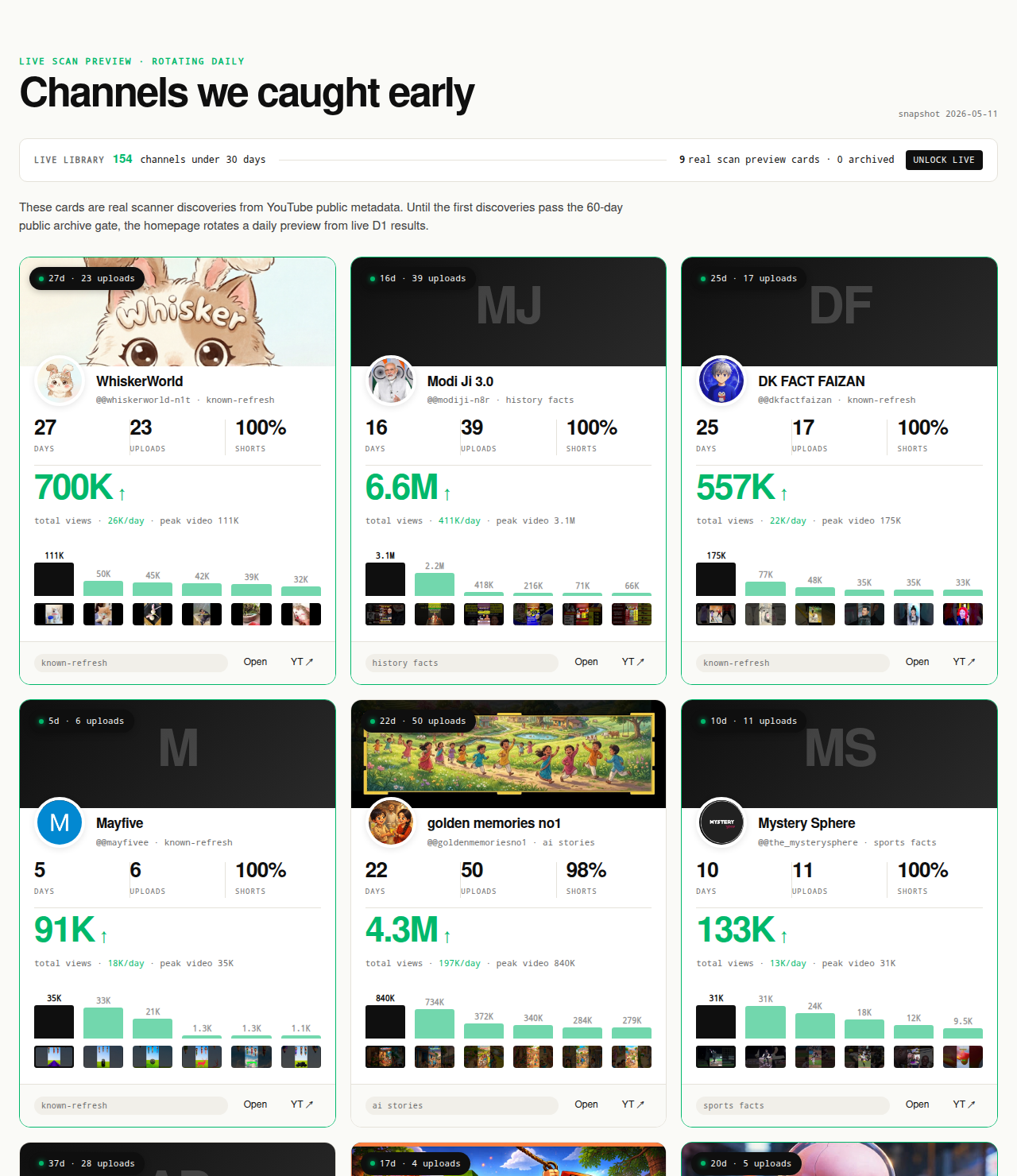
Original-research artifacts in this article: the two-questions framing in the opening section, the explicit public-vs-private Data API / Analytics API split, the six-step workflow with format-fingerprint, cadence, hook, topic-intersection, and deterministic-gate steps, the five-recurring-mistakes list, and the revealed channel cards above the fold. Cluster mix reflects what we have scanned, not all of YouTube. Author: Nicholas Major (Founder, NicheBreakout · Software engineer since 2011). Article last revised 2026-09-21.
Live scan freshness:
Related research
- YouTube channel research: parent pillar covering the broader discovery-plus-inspection workflow this page sits inside.
- YouTube channel finder: sibling cluster covering the discovery-layer question (how to find candidate competitors in the first place).
- Similar YouTube channel finder: sibling cluster covering the "channels like X" intent.
- How to find small YouTube channels: sibling guide covering the manual version of the discovery step.
- YouTube competitor analysis tool: sibling cluster covering the tool-comparison frame for readers shopping for a specific tool after methodology is settled.
- How to research YouTube channels: sibling guide covering the full research workflow at a higher level of abstraction.
- YouTube niche finder: sister pillar covering niche selection upstream of competitor analysis.
- Faceless YouTube niches: sister pillar covering the faceless production-mode angle.
- YouTube Shorts trends: sister pillar covering the Shorts-first publishing surface.
- YouTube outlier finder: sister pillar covering the breakout-discovery framing applied to any channel type.
- Most profitable YouTube niches: companion listicle backed by examples from the live discoveries cohort.
- AI story channels: programmatic topic page tracking the AI-storytelling cluster.
- Reddit story channels: programmatic topic page tracking the Reddit-narration cluster.
- History shorts channels: programmatic topic page tracking the history-shorts cluster.
- Faceless storytelling channels: programmatic topic page tracking the broader storytelling cluster.
- Quiz channels: programmatic topic page tracking the quiz/trivia cluster.
The Friday digest sends three current breakout channels every week with format fingerprints and outbound YouTube links — each one a research-worthy competitor candidate, free, present-tense. The live library refreshes daily and surfaces channels currently inside the 30-day window. See pricing for the current tier; subscribe to the digest free.
End of cluster
Run the six-step competitor analysis on today's small breakouts
Every channel card outbound-links to YouTube so the public Data API fields the workflow reads can be verified directly. The live under-30-day library is the paid workflow; the Friday digest is free.