/ Cluster · How to find small YouTube channels
How to find small YouTube channels (without paying for an enterprise tool)
Most "how to find small YouTube channels" guides tell you to scroll Trending or set a subscriber-count filter inside a third-party tool. Both surfaces are biased toward subscriber-count signals — Trending favors high-momentum channels regardless of size, Browse recommends what subscribers already watch — and neither surfaces the small channels currently breaking out where a new entrant has a real path. This guide is the procedural alternative: four concrete methods, an honest comparison, and a deterministic public-metadata signal set you can apply yourself. NicheBreakout's research base is thousands of channels scanned to date.

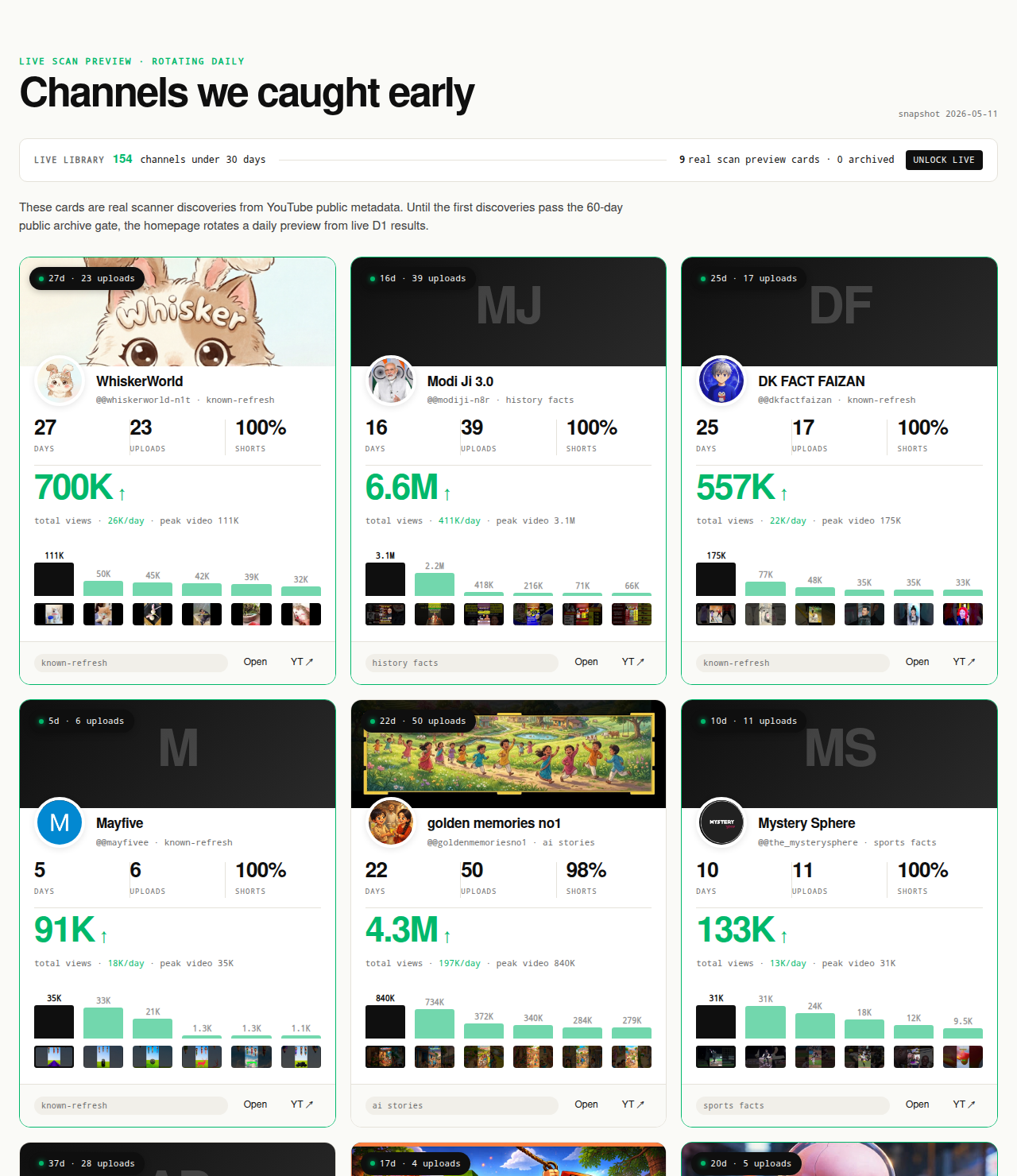
Ai stories by shano
 45d · 36 uploads
YOU & ME
 45d · 25 uploads
Dootoons TV
 45d · 69 uploads
Mr Pawsome
 42d · 64 uploads
sajkcasqq
 38d · 38 uploads
OP Nigma

FactD
 45d · 31 uploads
Cognexa Talks
 39d · 21 uploads
MapLore
Why small YouTube channels are hard to find by design
Small YouTube channels are not hard to find because they are rare. At any given moment several hundred thousand channels are simultaneously under 90 days old and publishing weekly. They are hard to find because YouTube's surfaces are structurally biased against showing them. The recommender, the Trending tab, and the search ranker are each tuned for engagement signals that newly created channels do not yet generate, so the channels that surface skew toward those that already cleared the small-channel layer months or years ago.
The recommender is the largest of the three surfaces. It reads engagement data on every video, builds an audience profile per channel, and surfaces channels to viewers whose profile matches. Channels under 45 days old have a thin engagement-data trail and an undertrained audience profile, so the recommender does not have enough signal to confidently surface them. The early-traction signal in public metadata fires several weeks before the recommender's training catches up — and that gap is the window this guide is built around.
Trending ranks by view-rate momentum over a short window, which small channels almost never produce. A channel with 80,000 subscribers can land on Trending because existing subscribers flood the early-hour view count; a channel with 800 subscribers needs the upload to go viral entirely through the recommender. Search rewards established engagement signals, topical authority across many uploads, and a match to the searcher's previous viewing history — none of which fire on a channel under 45 days old. The corollary: finding small YouTube channels requires leaving the default surfaces and using explicit signals the platform does not lead with.
The four methods that actually surface small channels under 90 days old
Four methods consistently surface small channels under 90 days old in our testing. None is a single best answer; each has different coverage, cost, and time profile, and most operators run two in parallel. The honest comparison:
- Method 1 — Manual YouTube search with publish-date filter. Cheapest, slowest, partial coverage. Best as a starting point or for niche-specific spot checks.
- Method 2 — Niche-specific community sources (Reddit, Discord, X). Free, manual, fastest to early signal. Small operators post their channels in niche-relevant subreddits, Discord servers, and X accounts weeks before the channels show up in search results. Requires knowing the communities and reading them weekly.
- Method 3 — Third-party channel-finder tools (vidIQ, Social Blade, NoxInfluencer, ChannelCrawler). Free tier plus paid upgrade, fastest filter speed. Mostly wraps the public Data API with better UX and historical scraping. ChannelCrawler is closest to the small-channel-discovery use case; the rest are stronger for per-channel inspection.
- Method 4 — Deterministic public-data discovery libraries (NicheBreakout, TubeLab, ChannelCrawler velocity filters). Free preview plus paid live tier, deepest filtering on view-velocity signal. Pre-filters on channel age, first-five-video views, and lifetime views per day — signals subscriber-count filters cannot replicate.
Trade-off: methods 1 and 2 cost zero dollars but require weekly operator time. Methods 3 and 4 cost money in the paid tiers but compress operator-time cost from hours to minutes per week. A reader running a single niche-research pass should start with methods 1 and 2; an operator running ongoing small-channel discovery should pair method 2 with method 4.
Method 1: manual YouTube search with the publish-date filter
The cheapest method is the one built into YouTube itself. The publish-date filter — under the "Filters" button at the top of any search results page — restricts results to videos uploaded inside a recency window. The "This week" and "This month" windows are the useful ones for small-channel discovery because they cap the inclusion window tightly enough that channels under 90 days old can compete in the result set.
The walkthrough. Open YouTube, type a niche-specific query ("vertical history shorts ancient rome," not "history"), hit Search, click Filters, set Upload date to This week, and set Type to Channel. The result is a list of channels whose most recent upload is inside the last seven days and whose channel-level metadata matches the search query. Click through each channel to the About page and read off the join date — small channels under 90 days old surface here, mixed in with older channels that happened to publish a recent video.
What this catches: channels publishing actively inside a defined niche, with a cadence consistent enough that they showed up inside the filter window. The first 20 to 40 channels typically include three to eight under-90-day candidates per narrow query. What this misses: channels publishing less frequently than the filter window; channels whose titles do not match typical search vocabulary; niches where the search ranker is dominated by large established channels that crowd out small ones. Narrower queries surface more small channels per scroll than broad ones.
The discipline that makes Method 1 work: write down 10 to 15 narrow niche queries up front, run all of them against the same filter window inside a single session, and capture each candidate into a spreadsheet with creation date, upload count, and views-per-day columns. Running one query at a time over a week produces drifting coverage as new uploads bump older ones out of the filter window.
Method 2: niche-specific community sources (Reddit, Discord, X)
Small channels usually appear in niche-relevant communities weeks before they appear in YouTube search results, because the operators are the ones sharing the links. Reddit is the strongest single source — most active niches have a corresponding subreddit, and the new-channel-introductions threads (often weekly or monthly stickied posts in r/NewTubers and the niche-specific subreddits) collect operator-submitted small channels with channel IDs and topic tags attached.
Discord and X are the secondary surfaces. Discord servers for specific YouTube niches — history-shorts, true-crime narration, AI-storytelling, faceless-channel-operator servers — include channel-submission and feedback channels where members post their own work. X is the noisiest but surfaces a different cohort: small operators often share uploads on their X account in the first few weeks, sometimes with metrics screenshots that include channel age and view counts.
The discipline that makes Method 2 work: pick three to five communities per niche taxonomy, set up a weekly check-in, and capture every channel posted into the same spreadsheet you use for Method 1. Channels that appear in both methods produce a higher-confidence shortlist — a channel that the operator is actively promoting and that has cleared the search filter is more likely to be running a sustainable cadence.
What Method 2 misses: channels whose operators do not promote them in public communities; channels in niches where the relevant communities are private, paid, or geographically restricted; channels in non-English-language niches where the relevant communities are elsewhere. Fastest early-signal latency of the four methods but the most unstable coverage; pair with Method 1 or Method 4 for breadth.
Method 3: third-party channel-finder tools
The third-party channel-finder category includes four widely used tools, each with a different angle on the small-channel-discovery use case. The honest one-line read on each:
- vidIQ. Strongest as an on-channel optimization tool for your own channel. For small-channel discovery it is not differentiated — the channel-research views show the same public Data API fields any other wrapper does, and the filter UX is built around per-channel inspection rather than cohort discovery. Misses: deterministic cohort filters on channel age and view velocity.
- Social Blade. The longest-running historical-scraping wrapper. Daily subscriber and view-count history going back years is the differentiator, and the rising-channels sort surfaces channels with high view-count growth rate. Misses: a creation-date filter — you cannot easily ask Social Blade for "channels created in the last 30 days."
- NoxInfluencer. Overlap with Social Blade on historical metrics, stronger framing toward influencer-marketing reports for brands. Filters on subscriber count, country, and niche category. Misses: any signal on first-five-video performance or view velocity at the small-channel layer.
- ChannelCrawler. The closest match to the small-channel-discovery use case of the four. Filterable directory with subscriber-range filters (0–1k, 1k–10k) and creation-date filters. The free tier is usable as a sourcing pass. Misses: view-velocity ranking inside the filtered cohort — you get a list of small channels by subscriber and age, but the cohort is not sorted by which ones are currently breaking out.
None of these tools has access to anything the public YouTube Data API does not expose. The differentiation is presentation, history depth, filter UX, and the secondary features layered on top of the same data floor. For pure small-channel discovery: ChannelCrawler first (best cohort filters), Social Blade second (rising-channels sort), vidIQ and NoxInfluencer third (per-channel inspection after the cohort is assembled).
Method 4: deterministic public-data discovery libraries
The fourth method is the one NicheBreakout occupies as a category, and the one this guide is most directly the procedural readout of. A deterministic public-data discovery library applies hard public-metadata filters to a continuously scanned channel set, then ranks the survivors with a transparent score. The output is a cohort of channels currently passing the filter, refreshed on a published cadence, with every channel auditable by clicking through to YouTube directly.
The signal set NicheBreakout applies — and the one you can apply yourself against any cohort assembled through Methods 1, 2, or 3 — is three hard gates plus two score bonuses. Full methodology on the methodology page; abbreviated:
Channel age
detected within 45 days of channel creationFirst-5 upload views
combined views across the first five public uploads ≥ 10,000Views per day
lifetime channel views ÷ channel age ≥ 1,000Format clarity (bonus)
score weights channels with a clear Shorts-first or long-form-first ratio above mixed-format channelsEarly-traction velocity (bonus)
score boost when channel age ≤ 14 days, first-5 sum ≥ 50,000, or views/day ≥ 5,000
Channel age under 45 days catches the window where recommendation surfaces, not subscribers, are doing the audience-finding work. First-five-video sum above 10,000 filters out channels whose first uploads landed flat — five uploads sharing 10,000 views indicates a working content vehicle, not a single lucky upload. Lifetime views per day above 1,000 is the cleanest velocity check available from public metadata; watch time, impressions, and click-through rate live behind the YouTube Analytics API (YouTube Data API: channels.list).
Other tools in this category — TubeLab covers a similar angle, ChannelCrawler's velocity-filtered views overlap partially — apply different thresholds but the pattern is the same: pre-filter on channel age and view velocity rather than on subscriber count, then rank inside the filtered cohort. Discovery libraries surface channels you do not already know about; inspection tools tell you more about channels you do. Sister pages YouTube channel finder, similar YouTube channel finder, YouTube niche finder, and parent pillar YouTube channel research cover adjacent categories.
Why subscriber count is the wrong filter
The subscriber-count filter is the dominant filter UX across the third-party channel-finder category, and it is the wrong primary signal. Three structural reasons. Subscriber count lags behind the actual audience-finding work the recommender does in the first 45 days — a channel can pass 50,000 lifetime views and still show under 1,000 subscribers. The public Data API rounds subscriber counts to three significant figures (YouTube Data API: channels.list); at the small-channel layer that rounding is a substantial fraction of the visible signal. And channels under 1,000 subscribers can hide their count entirely — any tool filtering on subscriber count drops them from the result.
The concrete comparison. A 14-day-old channel with 800 subscribers, six uploads, and 200,000 combined first-five-video views is one of the most interesting research targets the public Data API can surface — channel age under 14 days, first-5 sum above the 50,000 velocity-bonus threshold, view velocity over 14,000 per day. A 100,000-subscriber channel with one viral video and 30,000 views per day across its other uploads is less interesting — the channel-level signal is decoration on top of a single viral event, and the format may not be the variable doing the work.
A subscriber-count filter cannot distinguish those two channels. The 800-subscriber channel falls below any reasonable subscriber-floor filter; the 100,000-subscriber channel passes any reasonable subscriber-ceiling filter. The corrective is to filter on the signals that do read the breakout — channel age, first-five-video sum, lifetime views per day — and use subscriber count only as a soft tiebreaker. Any tool whose primary filter UX is a subscriber-count slider is selling per-channel inspection, not small-channel discovery.
What we deliberately don't claim about small-channel discovery
NicheBreakout does not claim comprehensive coverage of YouTube. The scan set is large but partial — thousands of channels to date is a meaningful sample of the small-channel layer in the niches we cover, not a census of every channel on the platform. Channels that do not enter our seed-query expansion paths do not appear in the library, regardless of whether they would pass the three hard gates if scanned. The honest claim is "channels currently passing the filter inside our scanned cohort," not "all channels currently passing the filter on YouTube."
The four-method comparison above acknowledges this directly. Method 1 catches channels whose recent uploads match the search-query vocabulary in the niche; Method 2 catches channels whose operators are actively promoting them. Pairing methods 1 and 2 with Method 4 is how you approach broader coverage; no single method covers the entire small-channel-breakout cohort.
NicheBreakout also does not claim to surface channels YouTube itself does not index. Every channel in the library has a public watch page, public channel page, and public Data API record — "hidden channel discovery" is a marketing phrase, not a real product category. Channels that YouTube has unlisted, suspended, or restricted for policy reasons are not visible to any third party including us, and any tool claiming access to that cohort is either inferring from non-API sources or fabricating the claim.
The public Data API itself has constraints that bound what any third-party tool in this category can promise. Subscriber counts are rounded to three significant figures and can be hidden by the channel owner; full upload history is paginated and rate-limited; the recent-uploads sort across the whole platform is not exposed as a queryable field — it can only be queried per-channel. Coverage is a function of which seed queries are running; it is not a function of paid tier or product version.
Common mistakes when searching for small YouTube channels
Five mistakes recur across the operators we have watched run the small-channel-discovery workflow, each correctable with a discipline change rather than a tool change.
Filtering by subscriber count instead of channel age. The dominant filter UX is a subscriber-count slider, and operators reflexively reach for it first. Subscriber count lags early traction, rounds to three significant figures, and can be hidden. The corrective is to filter on channel age first (under 45 days sharp, under 90 days soft), and use subscriber count only as a secondary check.
Using Trending as a small-channel discovery surface. Trending ranks by recent view-rate momentum, which favors channels with established subscriber bases who flood the early-hour view count. A small channel almost never makes Trending. Ignore Trending entirely for the discovery layer; use the publish-date filter inside Search instead.
Treating one viral video as a channel signal. A single video with 500,000 views on a channel whose other uploads sit under 1,000 views each is a viral fluke, not a working channel. Small-channel research needs first-five-video distribution data, not single-video peak counts. Sort the Videos tab oldest-first and read off the view counts of the first five uploads.
Searching for "small channels" instead of niches that contain small channels. The query "small YouTube channels" surfaces meta-content (this guide, listicles, tool comparisons), not small channels themselves. Define the niche narrowly first and search inside that niche — small channels surface as a byproduct of niche-specific search, not as a direct target.
Not capturing what you find. Operators who run the workflow once and discard the candidate list redo the same sourcing pass a month later. Keep a running spreadsheet with one row per candidate channel and columns for creation date, upload count, total views, views per day, niche taxonomy, and source method. The spreadsheet compounds into a corpus of channel-level evidence downstream workflows can run against.
The clusters currently producing the most small-channel breakouts in our scans
The four-method workflow above is signal-agnostic — it tells you how to find small channels regardless of niche. The downstream question is which niches are currently producing the most small-channel breakouts, because that is where the workflow's effort-per-discovered-channel ratio is best. Across NicheBreakout's matured public archive (the channels we detected when they were under 30 days old and that have since cleared a 60-day post-detection window), the densest niche clusters currently meeting our small-channel sample-size threshold are:
This is what we have observed inside our scanned cohort, not a market-wide claim, and it shifts week over week. The Shorts-first vs long-form split inside those top clusters:
The clusters that consistently produce the most small-channel breakouts are usually faceless or Shorts-first formats because those formats have the lowest production cost per upload, which lets a single operator publish enough times inside the 45-day window to produce readable signal. Five recurring clusters have dedicated programmatic topic pages indexing the currently-breaking-out small channels:
- AI story channels: TTS narration plus AI imagery, Shorts-first publishing.
- Reddit story channels: TTS reading r/AmITheAsshole, r/ProRevenge threads with stock visuals or character overlay.
- History shorts channels: fact-stacking with cinematic visuals.
- Faceless storytelling channels: broader narrative format spanning fiction and non-fiction.
- Quiz channels: interactive Q&A format, often Shorts-first with text overlays.
Each programmatic page is a pre-filtered candidate cohort the four-method workflow can run against without sourcing the niche from scratch.
FAQ
How do I find new YouTube channels?
Filter by channel creation date and recent upload date rather than by subscriber count. Inside YouTube's own search, set the search type to channels and the upload date to "This week" or "This month" — that restricts results to channels publishing inside the recency window where small-channel breakouts live. Outside YouTube, ChannelCrawler exposes a creation-date filter, Social Blade's rising-channels view sorts by view-count growth rate, and NicheBreakout publishes a deterministic three-gate cohort (channel age ≤ 45 days, first-5 sum ≥ 10,000, views/day ≥ 1,000). The mistake to avoid is starting at Trending — Trending favors high-momentum channels regardless of size.
What's a small YouTube channel?
A useful working definition has four dimensions, not one. Subscriber count under 50,000 is the conventional answer, but it is the weakest of the four. The other three: channel age under 90 days, upload count under 30, and lifetime view velocity under 50,000 views per day. A channel passing any one of those by itself is not particularly small; a channel passing three or four is what most people mean. Subscriber count is the dimension most tools filter on because the API exposes it directly, not because it is the most informative signal.
How do you find channels under 10k subscribers?
ChannelCrawler has a subscriber-count range filter (0–1k, 1k–10k) that surfaces channels at that band directly. Inside YouTube's own search the constraint is implicit — sort search results by upload date and filter to channels, and the recent-channels list will skew toward small channels because newly created channels have not accumulated subscribers yet. NicheBreakout's library does not filter on subscriber count because it lags the audience-finding work in the first 45 days; channels surfaced there are typically under 10,000 subscribers as a side effect of the channel-age and view-velocity gates.
Why doesn't YouTube show me small channels?
Two structural reasons. The recommender is trained to surface what subscribers and similar-audience viewers already watch, and small channels under 45 days old have no subscribers and no similar-audience training data yet. YouTube's Trending tab is built on a momentum signal that heavily favors channels with established subscriber bases who can flood the early-hour view count. Both surfaces are biased toward channels above the small-channel threshold; to surface channels below it you have to leave the default surfaces and use explicit date filters, niche-community sources, or third-party tools that index recently-created channels.
Are there free tools for finding small YouTube channels?
Yes, several. YouTube's own search has the upload-date filter built in, and the channel's About tab exposes creation date and view count to anyone who clicks through. ChannelCrawler's basic directory is free; Social Blade's free tier shows historical subscriber and view-count graphs for any channel; NicheBreakout's Friday digest sends three current small breakout channels each week for free. The paid surfaces in this category buy speed and filter depth, not access to data that is otherwise hidden — the YouTube Data API v3 fields are public to anyone with a free Google Cloud project.
How do I find small YouTube channels in a specific niche?
Define the niche narrowly first — "vertical 60-second history shorts about ancient Rome," not "history" — and run two passes. First: YouTube search with the niche terms, filter to channels, sort by upload date, scan the first three pages for channels under 90 days old. Second: niche-community sources (the relevant subreddit, niche-specific Discord servers, niche-relevant X accounts). The community-source pass usually finds small channels weeks before YouTube's own search does, because operators share their channels in places the search index is slow to follow.
What's the best way to find small channels?
There is no single best way; the four-method comparison on this page is the honest answer. Manual YouTube search is cheapest and most accessible, but the algorithm still weights established channels. Niche-community sources surface small channels weeks earlier than search but require reading the relevant communities weekly. Third-party channel-finder tools speed up filter work but mostly index the same public Data API fields you could read yourself. Deterministic discovery libraries pre-filter on channel age and view velocity, which is the signal subscriber-count filters cannot replicate. Most operators run two methods in parallel — manual search plus one deterministic library — and triangulate the survivors.
Can I find small YouTube channels before they go viral?
Sometimes, but "before they go viral" assumes a singular viral event an outside observer can predict, and that prediction is not what public metadata supports. What the public Data API does support is filtering for channels currently showing the early-traction pattern that historically precedes channel-level breakouts. A cohort assembled from those filters will include channels that go on to compound and channels that plateau; the filter is not a prediction. The honest claim is "finding small channels with abnormal early traction visible in public metadata right now," not "finding the next viral channel." The sister page on up and coming YouTube channels (when published) covers the listicle framing.
Methodology / About this analysis
NicheBreakout's research relies entirely on YouTube Data API v3 public fields: channel age, subscriber count, video count, view count, video metadata, publish dates, and recent video performance. The four-method workflow on this page is the procedural readout of how to apply those public fields to small-channel discovery — three of the four methods cost zero dollars to run, and the fourth is the paid surface where operator-time-per-channel compresses from hours to minutes. No private metrics (watch time, RPM, retention, audience demographics, traffic sources) appear in any method or any claim on this page.
Original-research artifacts: the four-method comparison framework, the honest one-line read on the major channel-finder tools, the subscriber-count-is-the-wrong-filter argument, the five common-mistakes list, and the revealed small-channel cards above the fold. Each card outbound-links to YouTube so the channel-age and view-velocity numbers are auditable in one click. Author: Nicholas Major (Founder, NicheBreakout · Software engineer since 2011). Article last revised 2026-09-21.
Live scan freshness:
Related research
- YouTube channel research: parent pillar covering the broader channel-discovery and inspection category.
- YouTube channel finder: sibling cluster on the tool-category framing.
- Similar YouTube channel finder: sibling cluster on the "find channels like X" sub-intent.
- YouTube niche finder: sister pillar on niche selection upstream of channel discovery.
- Faceless YouTube niches: sister pillar on the faceless production-mode angle.
- YouTube Shorts trends: sister pillar on the Shorts-first publishing surface.
- YouTube outlier finder: sister pillar on breakout-discovery framing.
- Most profitable YouTube niches: companion listicle backed by examples from the live cohort.
- How to do YouTube niche research: eight-step workflow that consumes the small-channel cohort.
- YouTube niche validation checklist: checklist version of the niche-research workflow.
- Up and coming YouTube channels (when published): sibling cluster covering the listicle framing.
- AI story channels, Reddit story channels, history shorts channels, faceless storytelling channels, and quiz channels: programmatic topic pages indexing specific small-channel clusters.
The Friday digest sends three current small breakout channels every week — exactly the cohort the four-method workflow is designed to assemble, pre-assembled for you. See pricing for the current tier; subscribe to the digest free.
End of cluster
Skip the manual sourcing — open the live library
Every small channel in the library outbound-links to YouTube so you can audit the channel-age and view-velocity numbers yourself, the same way the four-method workflow above asks you to. The live under-30-day library is the paid workflow; the Friday digest is free.