/ Cluster · How to do YouTube niche research
How to do YouTube niche research: an eight-step workflow with public data only
Most YouTube niche research content answers "which niche should I pick" — the WHAT question — and skips the HOW. This guide is the procedural version: eight sequential steps that move from operator constraints through format-first candidate generation, channel-evidence checks, saturation diagnostics, and a single action gate. Every step is one a reader can run this week against public YouTube Data API v3 metadata. NicheBreakout's research base is thousands of channels scanned to date — the same dataset the workflow's filter step uses to validate itself.

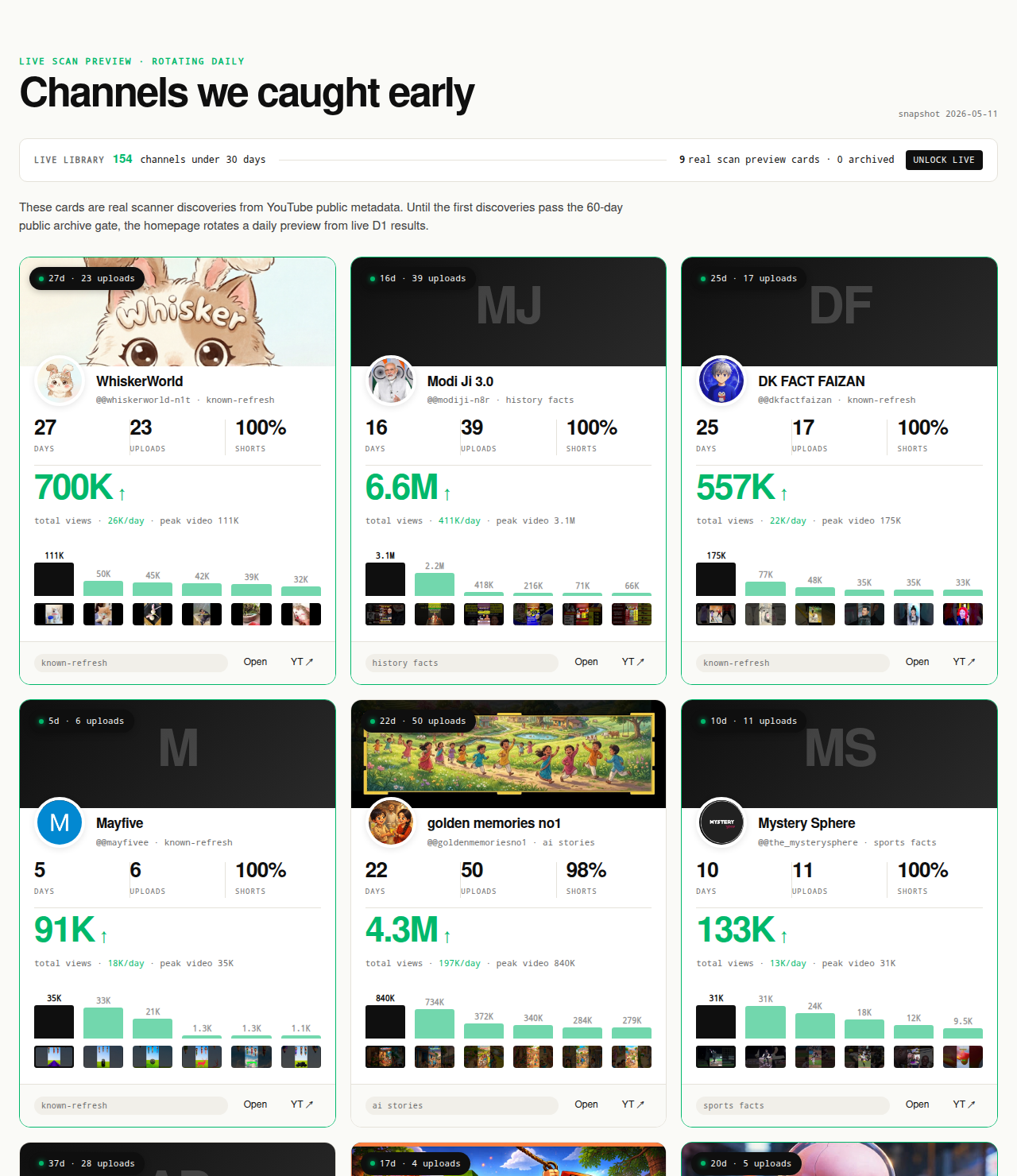
Ai stories by shano
 45d · 36 uploads
YOU & ME
 45d · 25 uploads
Dootoons TV
 45d · 69 uploads
Mr Pawsome
 42d · 64 uploads
sajkcasqq
 38d · 38 uploads
OP Nigma

FactD
 45d · 31 uploads
Cognexa Talks
 39d · 21 uploads
MapLore
Why most YouTube niche research fails
The dominant YouTube-niche-research SERP splits into two failure modes. The first is the listicle: "10 niches to research in 2026," "top faceless niches." Listicles answer the WHAT and skip the HOW. A reader leaves with a niche name and no procedure for verifying it, which means the niche gets selected by which list ranked highest in search, not by whether small channels in that niche are currently breaking out. The second failure mode is the tool tutorial: "how to use vidIQ to find niches," "how to use Google Trends for YouTube research." Tool tutorials skip the upstream question entirely.
The gap between those two failure modes is procedural. A creator who has read both genres exhaustively still cannot answer "what sequence of steps do I run to go from no niche to a niche backed by channel-level evidence?" The eight steps below answer that. They are sequential because each prunes the candidate set the next inherits — running them out of order leaves filter ambiguity that compounds downstream.
The reframe that makes the work tractable: niche research is a research task, not a brainstorming task. The output is not a niche name; it is a niche name plus the channel-level evidence supporting it. A creator who finishes the workflow can point at three small channels under 90 days old, all using the same format, all passing the traction floor. A creator who cannot point at that evidence has not done niche research; they have made a hopeful pick. This guide is the cluster companion to the YouTube niche finder pillar — the pillar covers the tool-category framing and signal set; this page covers the procedure.
The eight-step workflow at a glance
The full workflow runs end to end in a focused afternoon — three to five hours of operator time. The eight steps prune the candidate set in this order:
- Step 1: Define your operator constraints. Production mode, time budget, monetization mix.
- Step 2: Generate a candidate list of formats, not topics. Format-first thinking prevents the listicle trap.
- Step 3: Find at least three small channels currently breaking out in each candidate format. The deterministic filter; signal list lives here.
- Step 4: Inspect each candidate channel for format fingerprint. Six-point checklist against the channel's public uploads.
- Step 5: Cross-check against the saturation question. Is the niche still admitting new small channels?
- Step 6: Validate format clarity. Single recommender-readable signal, or format-mixed?
- Step 7: Rule out the "looks easy" trap. Low production cost is not low saturation.
- Step 8: Commit to a single format-topic intersection and publish. The action gate.
Steps 3 and 5 prune the most candidates. Steps 4, 6, and 7 are quality gates against the Step 3 survivors. Steps 1, 2, and 8 frame the work. A common shortcut is to skip Steps 1 and 2 and start at Step 3 with a topic in hand, which produces a workable shortlist for that topic but cannot answer whether a different format-topic combination would have ranked higher. Run the steps in order on the first pass.
Step 1: Define your operator constraints
Niche choice is downstream of operator constraints, not upstream. Three constraints frame every downstream filter. Writing them down in plain text before opening YouTube is the cheapest discipline in the workflow.
Production mode. What rig can you actually run weekly — face-on-camera with editorial scripting, faceless TTS-plus-stock-footage, AI-narrated-plus-AI-imagery, screen-recorded explainer, voiceover-plus-B-roll? A creator who picks a niche before answering this commits to a format their production capacity cannot sustain, which shows up as upload-cadence collapse around week three.
Time budget per week. Three hours, six, fifteen? A 12-minute voiceover documentary needs four to six hours of editorial work even with templates; a 45-second vertical TTS short needs forty-five minutes. Three weekly hours plus a documentary niche cannot sustain the publishing cadence the recommender rewards.
Monetization mix. AdSense, sponsorships, your own product funnel, an email list, or audience-building for a future move? Monetization-friendly niches (finance, software, B2B explainers) and audience-friendly niches (storytelling, true crime, entertainment) have different breakout density patterns and different downstream value per viewer.
The output of Step 1 is three sentences: production mode, weekly hours, monetization mix. Those three sentences disqualify roughly two-thirds of the candidate format set the next step generates. Most niche-research failures trace back to skipping this paragraph and treating the workflow as topic-shopping.
Step 2: Generate a candidate list of formats, not topics
The format-versus-topic distinction is the single most useful frame in YouTube niche research and the one most listicles collapse. A topic is what a video is about — history, finance, cooking, gaming. A format is how the video is constructed — vertical TTS shorts, long-form face-on-camera documentary, screen-recorded teardown, voiceover-plus-B-roll narrative, multi-host podcast. The recommender does not read topics directly; it reads format consistency through proxies (video length, aspect ratio, upload cadence, thumbnail style, on-screen-text density) and matches each format to an audience. A topic that wins inside one format can flatline inside a different format on the same channel.
Generate ten to fifteen candidate formats that fit the Step 1 production mode. For a faceless TTS rig, candidates might include vertical TTS history-fact shorts, vertical TTS Reddit-narration shorts, long-form TTS-plus-AI-imagery true-crime narration, and screen-recorded software-walkthrough explainers. For a face-on-camera rig, candidates might include long-form documentary explainer, mid-length tutorial with face overlay, short-form face-to-camera vertical commentary, and sit-down interview format.
Most operators run this step in reverse — they pick a topic ("I want to make finance videos") and then notice that finance contains multiple formats, only one of which fits their constraints. The format-first approach surfaces the constraint match earlier. Two operating rules: every format must be one the operator could publish a finished pilot of inside two weeks at the Step 1 production rig; and a "format" that mixes Shorts and long-form is two formats, not one — list them separately.
Step 3: Find at least three small channels currently breaking out in each candidate format
This is the deterministic filter step. For each candidate format from Step 2, find at least three small channels under 90 days old that are currently breaking out inside that format. "Breaking out" means the channel passes a public-metadata traction floor — channel age, upload count, views-per-day, first-five-video views — verifiable directly from public channel pages or the YouTube Data API v3.
The signal set NicheBreakout uses (and that you can run manually against any candidate channel) is the same one published on the parent pillar:
Channel age
detected within 45 days of channel creationFirst-5 upload views
combined views across the first five public uploads ≥ 10,000Views per day
lifetime channel views ÷ channel age ≥ 1,000Format clarity (bonus)
score weights channels with a clear Shorts-first or long-form-first ratio above mixed-format channelsEarly-traction velocity (bonus)
score boost when channel age ≤ 14 days, first-5 sum ≥ 50,000, or views/day ≥ 5,000
The three hard gates each isolate a different piece of the early-traction picture. Channel age ≤ 45 days catches the window where recommendation surfaces, not subscribers, are doing the audience-finding work. First-five-video sum views ≥ 10,000 filters out channels whose first uploads landed flat — five uploads sharing 10,000 views means a working content vehicle, not a single viral first upload an operator may not be able to replicate. Lifetime views per day ≥ 1,000 is the cleanest velocity check available from public metadata; watch time, impressions, and click-through rate live behind the YouTube Analytics API and cannot be third-party-verified (YouTube Data API: channels.list).
The manual sourcing flow: open YouTube's search interface, filter to channels, filter to upload date within the last 90 days, and search the topic terms your candidate format covers. For each channel, note its creation date and upload count from the About page, calculate views-per-day from total views divided by channel age in days, and read off the first-five-video view counts from the Videos tab sorted oldest-first. A spreadsheet with one row per channel and one column per signal is the right substrate.
If a candidate format cannot produce three channels passing the hard gates, cross it off. A starting list of fifteen formats commonly reduces to three to six survivors. The cross-pillar guide how to find small YouTube channels walks through the sourcing tactics in more depth.
Step 4: Inspect each candidate channel for format fingerprint
Every channel that survives Step 3 needs a closer inspection. The six-point checklist below produces the format fingerprint — the concrete, copyable shape of what is actually working. Everything is readable from the Videos tab and the About page without any tool more sophisticated than a browser.
1. Channel age. Confirm the creation date from the About page. If the channel re-launched (rebranded, name-changed), the original account creation date is what matters — the rebrand does not reset the recommender's history of the channel ID, which means the channel is not a clean comparison case for a true cold start.
2. First-5 video views. Sort Videos oldest-first and sum the view counts of the first five uploads. Under 10,000 means the channel failed the Step 3 hard gate. Above 50,000 is velocity-bonus territory. The first-5 sum reads whether the format itself connected, not whether a single later video caught a viral break.
3. Upload cadence. Days between the first and most recent upload, divided by upload count, produces "uploads per week." A channel cadence above your Step 1 time budget is one you cannot replicate.
4. Thumbnail consistency. Scroll the Videos tab and look at every thumbnail simultaneously. Same font, layout, color palette? Inconsistent thumbnails mean the channel is iterating without converging, and the recommender penalizes thumbnail-style switches the same way it penalizes format switches.
5. Video length. Open three to five videos. Is the channel Shorts-first (every video under 60 seconds, vertical), long-form-first (every video over 5 minutes), or mixed? Mixed channels are not single-format channels and break Step 6's clarity check.
6. Niche taxonomy. What does the channel cover, narrowly? "History" is too broad; "60-second vertical fact-stacks about ancient Roman daily life" is a niche taxonomy. The narrower you can describe the channel's topic, the more accurate your Step 5 saturation read.
The output of Step 4 is one row per surviving channel with six filled cells. If you cannot fill every cell from public pages, the channel is not a usable evidence point — drop it.
Step 5: Cross-check against the saturation question
The saturation question is not "how many channels exist in this niche" — it is "is the niche still admitting new small channels, or only feeding the largest ones." A niche that produced one breakout channel in March and has admitted no new small channels since is saturated. The same niche producing three more breakouts in April and two more in May is open.
The public-data proxy: are channels under 30 days old still appearing inside the niche's recent-channels feed? Open YouTube's search, filter to channels, sort by newest, and search the niche taxonomy from Step 4. If the top of the list is populated with channels under 30 days old that pass the Step 3 hard gates, the niche is admitting new entrants. If the top is mature channels re-titled, channels rebranding from other niches, or under-30-day channels failing the traction floor, the recommender is not surfacing new operators.
The saturation pattern most commonly missed: a niche where the largest channels are still growing but no new small channels are surfacing. From a listicle perspective the niche looks healthy; for a new entrant it is unworkable. Two sharpening diagnostics. First, how recent is the first upload of your Step 3 channels? If the most recent small breakout is sixty days old and nothing new has surfaced in thirty days, the admission window may have closed. Second, look at the new-channels feed channels that fail the Step 3 gates — same format and failing is the saturation tell.
Saturation is a property of the format-topic intersection, not the parent topic. "AI storytelling" has thousands of channels and is widely described as crowded; specific sub-formats inside it (AI-generated medieval-history vertical shorts, AI-generated cosmic-horror anthologies, AI-generated true-crime narration) keep producing breakouts inside the 45-day window. Ask Step 5 at the narrow intersection from Step 4, never at the parent topic.
Step 6: Validate format clarity
The recommender does not see your channel's topic directly; it reads format consistency through video length, aspect ratio, upload cadence, thumbnail style, and on-screen text density. A new channel that publishes three Shorts and one long-form in week one is asking the recommender to evaluate it on both surfaces simultaneously, and the early-traction signal flatlines.
For each surviving candidate from Step 4, ask three questions. Is the video length consistent — single band of 8 to 12 minutes, or 45 to 75 seconds, or mixed? Is the thumbnail style consistent? Is the upload cadence consistent? A format that fails all three is not a single format; drop it unless no other survivor exists.
The most common Step 6 mistake is confusing "the channel is iterating on its format" with "the channel is format-mixing." An iterating channel converges — early thumbnails differ, but the last five match. A format-mixing channel does not converge. Read the most recent five videos as the diagnostic, not the first five. The recommender weights recent format-consistency more than historical, which is why iterating channels can still break out and why genuinely format-mixed channels can hit the Step 3 traction floor once and plateau.
Step 7: Rule out the "looks easy" trap
The most dangerous niches are the ones that look easiest. Low production cost is not low saturation — the easiest formats to copy are the fastest to saturate. Every operator looking for a starting niche eventually arrives at "what is the cheapest thing I can publish weekly," and the answers converge. A format that takes forty-five minutes per upload will see ten thousand operators trying it the month after it lands on a top listicle. A format that takes six hours of editorial work will see ten.
The diagnostic runs against the data from Steps 3 and 4. For each surviving format, ask: how many failing channels are publishing it on the new-channels feed? If the format is producing a few breakouts and hundreds of flatlining new channels, the breakouts are edge cases — operators with editorial taste distinguishing them from the median copy. The format itself is not the variable doing the work; the editorial layer on top of it is.
Compare breakouts from Step 3 to failing channels at the same intersection. If the difference is something a new operator can copy (template thumbnail layout, opening hook structure, specific topic angle), the format is replicable. If the difference requires editorial taste — a script-writing style that takes years, voice-acting capacity, a comedy sensibility — the format is not replicable regardless of how cheap the rig is.
Two formats that frequently fail Step 7 in our scans: pure-template Reddit-narration channels (only the ones with character-voicing or editorial selection survive) and pure-template AI-imagery storytelling channels (only the ones with original story-construction survive). The corrective is to budget editorial work, not production work — spend more time per upload on script, hook, and topic selection than on TTS rendering and thumbnail templating.
Step 8: Commit to a single format-topic intersection and publish before you over-research
The most common stall is between Step 7 and Step 8 — research-as-procrastination. An operator who has run Steps 1 through 7 has more channel-level evidence than 95 percent of new YouTube creators ever assemble; the marginal value of running the workflow again on the same set is near zero. The marginal value of publishing the pilot is what the workflow has been building toward.
Step 8 is an action gate. Commit to a single format-topic intersection from the Step 4 survivors — one production mode, one video length band, one narrow topic taxonomy. Publish the pilot inside two weeks of commit. The pilot does not need to be perfect; it needs to exist, because everything after Step 8 happens against real public-metadata signal from a real channel.
The single-intersection rule is non-negotiable. An operator who hedges between two surviving formats and publishes both on the same channel reproduces the format-mixed problem Step 6 filters out. If two formats survive Step 7 and you cannot pick, run two channels — but not in week one. Pick one for the first ten uploads, evaluate against the Step 3 hard gates as a target, and only consider the second after the first has cleared or failed.
The publish-first discipline shows up in pattern: operators who publish inside two weeks of commit produce more channels that clear the 45-day breakout window than operators who spend four weeks polishing the pilot. If you cannot commit to a single intersection after the previous seven steps, the candidate set is the problem, not the workflow — widen Step 2 (more candidate formats) or relax Step 1 (loosen a production-mode constraint). The YouTube niche validation checklist formalizes Step 8's commit criteria into a pass-fail document.
What this workflow deliberately doesn't include
Two omissions are deliberate. The first is RPM forecasting. Per-niche RPM and revenue figures live behind the YouTube Analytics API and authenticated AdSense reporting; they are not third-party-accessible for any channel a researcher does not own. Listicles that publish per-niche RPM tables are extrapolating from anecdotes, repackaging older anecdotes, or fabricating the numbers. The right way to handle the monetization question is the Step 1 monetization-mix constraint — qualitative and operator-side, not per-niche.
The second omission is video-level keyword research. Search-volume estimates, autocomplete mining, ranking-difficulty scores are all downstream of niche selection. A creator who runs keyword research at the niche stage is optimizing the wrong layer — picking video titles before picking the format-topic intersection those titles will live inside. Tools in the YouTube SEO category (vidIQ, TubeBuddy) are useful after Step 8, not before. The why we are not a keyword research tool cluster page covers the boundary in more depth.
Two further omissions. The workflow does not use AI-generated channel summaries — an LLM cannot tell you why a channel is breaking out, because the causal story requires private channel telemetry the LLM has no access to. And the workflow does not rely on subscriber count as a primary signal. Subscriber count is hidden for channels under 1,000 subscribers, rounded to three significant figures by the public Data API (YouTube Data API: channels), and lags behind the actual audience-finding work the recommender does in the first 45 days. Views-per-day and first-five-video sum carry the early-traction information; subscriber count is a secondary signal at most.
FAQ
How long does YouTube niche research take?
A first-pass workflow takes one focused afternoon — three to five hours from operator-constraint definition through to a committed format-topic intersection. The eight steps compress to that window because most of the work is examining specific channels, not reading market reports. A research pass that takes three weeks usually means Step 1's operator constraints were skipped. Re-do the research quarterly, not weekly.
How many channels do I need to find before I commit?
At least three small channels under 90 days old, all using the same format, all passing the first-five-video traction check. Three is the floor because one breakout is a fluke, two could be coincidence, and three is the minimum sample where the format itself — not a single creator's editorial taste — is the variable doing the work.
Can I do YouTube niche research for free?
Yes. Every step uses public YouTube Data API v3 metadata, readable by anyone with a free Google Cloud project and an API key. The manual workflow needs no paid tools — YouTube's own search, channel pages, and recent-uploads sort source the candidates; a spreadsheet handles the arithmetic. Paid libraries like NicheBreakout's live 30-day window compress the same workflow into filter clicks instead of manual lookups.
What's the difference between niche research and keyword research?
Niche research is upstream. It answers "is this format-topic intersection currently producing small-channel breakouts." Keyword research answers "inside the niche I've already chosen, which specific titles rank right now." The two run on different data sources — niche research reads channel-level public metadata; keyword research reads search-volume estimates. Doing keyword research first locks the creator into optimizing titles inside a niche that may not be admitting new entrants.
Should I copy successful YouTube channels?
Copy what's working right now, not what worked years ago. The common mistake is studying a channel with two million subscribers and copying its current strategy — which is downstream of two years of recommender-trained audience momentum. The mature channel's strategy fits its accumulated audience, not a cold start. Copy the format from channels under 90 days old that are currently breaking out inside the niche.
How often should I redo my niche research?
Quarterly is the empirical cadence. The breakout-density picture inside a niche can shift inside three months as new format clusters surface and older ones saturate. Between full re-runs, a 15-minute monthly spot check on three small channels inside the chosen niche is enough to flag a saturation shift early. Re-doing the workflow weekly is procrastination dressed as discipline.
What's the most common YouTube niche research mistake?
Picking a niche from a listicle without verifying that any small channels in that niche are currently breaking out. The listicle SERP is dominated by recycled lists where the dates change but the niche set is two or three years old. The corrective is the channel-evidence check in Step 3 — three small channels under 90 days old, same format, all clearing the traction floor.
Is YouTube niche research the same as YouTube SEO?
No. Niche research is the choice of which channel to start; YouTube SEO is the optimization of an individual video's title, description, tags, and thumbnail inside an already-chosen channel. Tools in the YouTube SEO category (vidIQ, TubeBuddy) operate downstream of the niche decision. The difference is whether the niche being optimized inside is admitting new small channels at all.
Methodology / About this analysis
NicheBreakout's research relies entirely on YouTube Data API v3 public fields: channel age, subscriber count, video count, view count, video metadata, video publish dates, and recent video performance. The eight-step workflow on this page is the procedural readout of the same methodology the live library uses to flag candidates — channel age, first-five-video views, lifetime views-per-day, format clarity, early-traction velocity. No private metrics (watch time, RPM, retention, audience demographics) appear in any step. The workflow is designed to be run manually by a single operator with a free Google Cloud API key, a browser, and a spreadsheet; the paid library compresses Step 3 from manual sourcing into filter clicks but does not change which signals matter.
Original-research artifacts in this article: the eight-step workflow itself, the six-point format-fingerprint checklist in Step 4, the format-versus-topic distinction in Step 2, the saturation diagnostic in Step 5, and the looks-easy-trap analysis in Step 7. The candidate channels surfaced above the fold are revealed for verification — each card outbound-links to YouTube so the public metadata is auditable in one click. Author: Nicholas Major (Founder, NicheBreakout · Software engineer since 2011). Article last revised 2026-09-21.
Live scan freshness:
Related research
- YouTube niche finder: parent pillar covering the niche-finder tool category and the signal set this workflow operationalizes.
- YouTube niche validation checklist: sibling cluster — the checklist version of this guide.
- How to find small YouTube channels: the sourcing-side companion to Step 3.
- Faceless YouTube niches: sister pillar covering the four production modes operators most commonly pick in Step 1.
- YouTube Shorts trends: sister pillar covering the Shorts-first publishing angle Step 6 builds on.
- YouTube outlier finder: sister pillar covering the breakout-discovery framing Step 3 inherits.
- YouTube channel research: sister pillar covering the broader channel-discovery category.
- Most profitable YouTube niches: companion listicle useful for Step 2 candidate generation against the monetization-mix constraint.
- AI story channels, Reddit story channels, history shorts channels, faceless storytelling channels, and quiz channels: programmatic topic pages indexing specific format clusters in our scans.
The Friday digest sends three current breakout channels every week — the same channel-evidence shape this workflow asks you to assemble manually. See pricing for the current tier; subscribe to the digest free.
End of cluster
Skip the manual sourcing — open the live library
Every channel card outbound-links to YouTube so you can audit the public metadata yourself, the same way Step 4's format-fingerprint checklist asks you to. The live under-30-day library is the paid workflow; the Friday digest is free.